Highway Weather
- 3.4
- Rating
- 500.00K
- Installs
- Free
- Price
 Analysis by App-foxy
When I plan a long drive, the usual weather app gives me a forecast for where I am now or where I will arrive. That is useful, but it leaves a practical gap: the conditions can change several times while I am still on the road. Highway Weather, a travel-focused weather app from Weather Route, Inc., is built around that gap. I use it to think about weather as part of the journey rather than as a single location.
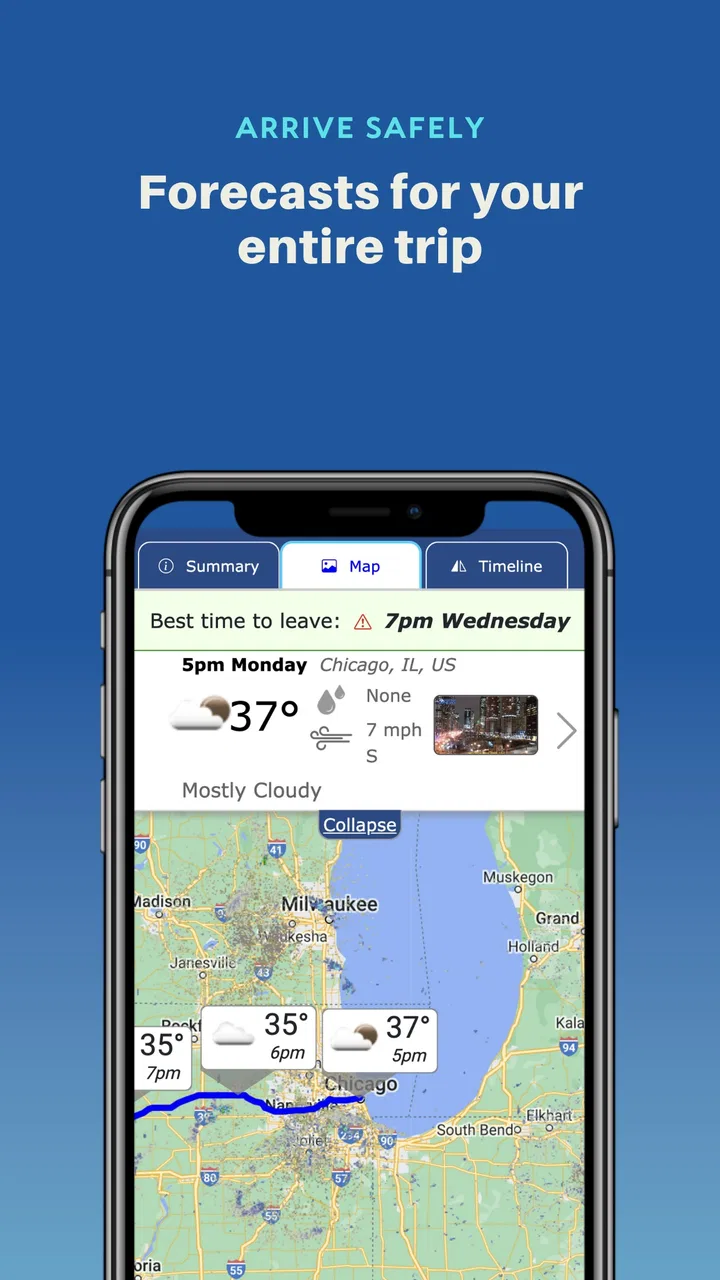
That difference sounds small until a trip crosses several towns, elevations, or weather systems. A departure forecast may look comfortable while rain is expected near the destination later in the day. Conversely, a gloomy forecast at home may not matter if the road ahead clears before I reach it. The app’s main idea is to connect the forecast with the expected arrival point in time, which makes it more relevant to drivers than a standard hourly forecast screen.
Highway Weather is a free weather app for road trips, rated for Everyone. It has been available since January 24, 2013, and the current version is 6.128. Its Android requirements begin at version 7.0, so it remains accessible on many older devices. The app has passed over 500 thousand installs, with an average rating of 3.4 from around 2.2 thousand ratings. That mixed score matches my impression: the concept is genuinely useful, but the value depends heavily on how you travel and what information you expect from a weather tool.
You May Also Like

 Blood Strike: 2.5 Anniversary
Blood Strike’s Loadouts Turn Every Drop Into a Tactical Gamble
A close look at Blood Strike’s custom loadouts: how fast access to signature weapons reshapes its battle royale rhythm, rewards preparation, and narrows the gap between fights.

 Pandora - Music & Podcasts
Pandora’s Music Is Easy to Start, but Harder to Recover
Pandora’s strength is its low-effort path from a seed to a station. Its weak spot is how much confidence it asks you to place in connection, setup, and quiet recovery.

 8 Ball Pool
 Is Built on Rivalries, Rematches, and Routine
A close look at the rivalries, rematches, shared routines, and unanswered safety questions that turn a quick pool match into a persistent mobile community.

 Samsung Music
’s Quiet Strength Is Playing What You Already Own
Its reach comes less from spectacle than from dependable access to a personal library. That simplicity is both the app’s strongest retention engine and its ceiling.

 AccuWeather: Weather Radar
AccuWeather Review: A Quick, Clear Forecast for Everyday Decisions
For everyday plans, the best forecast is the one you can understand quickly. AccuWeather makes rain timing, radar, and local conditions easy to act on, with a few trade-offs.

 Hill Climb Racing
Why Hill Climb Racing Still Turns Crashes Into One More Run
A tiny car, a bumpy hill and one more upgrade: Hill Climb Racing keeps resurfacing because its simple chaos makes every near-miss feel personal.
More From Our News Desk



From trip idea to arrival-time forecast
I find that the most useful shared-trip conversation starts with the forecast but ends with a clear plan: when we expect to leave, where the weather may change, and who will revisit it before departure. In the next section, I look at how to keep those assumptions tidy when more than one person helps plan or drive.
Starting with the actual driving problem
I would not open this app simply to check whether it is raining outside my window. That is where a conventional weather service is usually faster. I open it when I have a route to consider and want to know what the weather may be like along the way, especially at the time I expect to reach different parts of the trip.
A realistic example is a morning drive to visit family in another city. I might leave after breakfast, spend several hours on the highway, stop once for fuel, and arrive in the afternoon. A normal forecast can show the weather at the starting point and destination as separate snapshots. Highway Weather encourages a different question: what will I encounter as the journey progresses, and what will conditions look like when I arrive?
That framing is the app’s strongest advantage. It helps me notice timing problems that are easy to miss when I compare two isolated forecasts. A destination may be dry at noon but wet later, or the route may move from clear skies into a period of poor visibility. I still need judgment, but the app gives the journey a more useful weather context.
Building a route instead of checking one place
The first practical step is to set up the trip so the forecast can be connected to the route. I treat this as planning rather than browsing. I think about where I am leaving from, where I am going, when I expect to depart, and whether my expected arrival time is realistic. The quality of the result depends on those assumptions, so I avoid entering an optimistic travel time just because I would like to arrive sooner.
This is an important workflow detail. If traffic, charging, meals, or a rest stop will add time, I include that in my mental plan before interpreting the weather. A forecast tied to the wrong arrival time can be less helpful than a simple local forecast. The app does not replace route planning; it makes route planning more weather-aware.
I also use it before deciding whether a trip should happen at all. If the weather looks manageable at departure but more difficult later, I can compare leaving earlier, leaving later, or postponing. That is more useful than reacting to the sky only after I am already committed to the highway.
Reading the trip as a sequence
Once the route is prepared, I look at the journey in stages rather than searching for one reassuring headline. The useful question is not only whether the overall trip appears good. I want to identify when the conditions change and whether those changes happen during a part of the drive where I have fewer alternatives.
For example, a short shower near the beginning may be easy to handle because I can delay departure. The same shower near a remote stretch, after sunset, or during the final approach to an unfamiliar destination deserves more attention. This is one of the app’s less obvious benefits: it encourages me to connect weather with the practical shape of the trip.
I would not treat every forecast change as a reason to cancel. Weather forecasts are estimates, and a route view can create a false sense of precision if I forget that conditions may shift. I use the information to make sensible choices about timing and preparation, not to assume that every minute of the drive will unfold exactly as displayed.
Turning the forecast into a departure decision
After reviewing the route, I make a simple decision: go as planned, adjust the departure, add more time, or choose another day. The app is most valuable when it changes that decision in a concrete way. If it only confirms that the weather is broadly fine, it has still saved me from checking several locations manually, but its real strength appears when the route and timing reveal a complication.
One practical habit is to check once during planning and again shortly before leaving. I do not rely on the first forecast for an entire day of driving. The second look helps me catch a changed arrival window or a developing system. I also keep ordinary safety habits in place: I avoid checking a phone while moving, and I do not let a convenient forecast override road signs, local warnings, or my own view of conditions.
Where handoffs become important
Road trips rarely belong to one person from beginning to end. A passenger may plan the route, a second driver may take over later, and someone at home may want to know when the travelers are likely to arrive. This is where the app’s journey-centered approach can be useful, but only if the plan is communicated clearly.
I would share the practical conclusion rather than merely saying that the forecast looks fine. “We are leaving later because the rain should ease before the middle of the drive” is more useful than sending a screenshot without context. If another driver takes over, I would explain the assumptions behind the timing so that person understands why the forecast was checked.
This handoff also exposes a limitation. A weather plan is only as reliable as the route and arrival estimate being used. If the driver changes the destination, takes a long break, or encounters serious traffic, the original interpretation can become outdated. The app helps organize the information, but it does not automatically make every handoff accurate.
What the result feels like in everyday use
The outcome I get is not a promise of perfect road conditions. It is a better-informed travel plan. I can leave with a clearer idea of whether weather is likely to be a minor inconvenience or something that should change my schedule. That distinction matters more to me than having another screen full of icons.
For a family trip, the result might be deciding to depart before a period of rain. For a delivery driver, it might mean allowing extra time for a route that crosses several weather conditions. For someone driving to an outdoor event, it can help determine whether arriving early is worthwhile. The app is particularly sensible for journeys where the destination forecast alone does not tell the whole story.
I also find the approach helpful for drivers who are uncomfortable with long-distance weather changes. Instead of opening a map and several city forecasts, they can begin with the trip itself. That reduces the mental work involved in assembling a picture from separate sources. It does not remove uncertainty, but it makes the uncertainty easier to discuss and plan around.
Three useful habits that improve the workflow
- Use a realistic arrival time: include breaks, charging, meals, and likely delays before judging the forecast. A weather view based on an imaginary schedule can lead to the wrong decision.
- Focus on transitions: pay attention to where conditions may change during the trip, not just whether the starting point and destination look acceptable.
- Recheck before departure: treat the first plan as a planning aid, then review it again close to leaving because a long drive can outlast the confidence of an earlier forecast.
These habits are not flashy features, but they are where I get the most value. The store summary presents the idea of forecasting weather for a trip at arrival time, while the practical benefit comes from using that idea carefully. The app works best when I treat it as a decision-making tool rather than a guarantee.
When a normal weather app is the better choice
For a short local errand, I usually prefer a familiar general-purpose weather app. If I only need the current temperature, a quick rain check, or a forecast for one neighborhood, a route-oriented workflow may feel like extra effort. Highway Weather is not automatically better just because the trip is in a car.
It is also not the right sole source for severe-weather decisions. When conditions are dangerous, I want authoritative alerts and local official guidance in addition to any travel forecast. The app can help me think about timing along a route, but it should not be treated as an emergency warning system or a substitute for responsible driving.
Likewise, people who want radar depth, detailed meteorological layers, or a broad collection of specialized weather tools may find a dedicated weather service more satisfying. Highway Weather’s appeal is its travel perspective. If that perspective is not relevant to the way you use weather information, the app’s focused design may feel limited rather than refreshingly simple.
Cost, expectations, and the less comfortable parts
The app is free to install, with in-app purchases ranging from $3.99 to $17.99 per item. That makes it easy to try without committing money at the start, but I would pay attention to which parts of the experience require an upgrade before making it part of my regular travel routine. A free entry point is helpful, yet the overall value depends on whether the available planning tools match how often I drive long distances.
The 3.4 average rating suggests that the experience will not suit everyone. In my view, the likely friction comes from the difference between a clever travel concept and the messy reality of forecasting. A route can be planned precisely, but weather itself remains variable. Users expecting certainty may be disappointed, while users who want a practical planning layer may appreciate the focused approach.
I also would not assume that a route forecast eliminates the need for common sense. The app cannot know every personal factor that affects a trip, such as a driver’s comfort at night, a vehicle’s condition, or whether a passenger needs more frequent stops. Those factors belong in the final decision. The forecast is one input, not the entire plan.
Who should install it
I recommend trying Highway Weather if you regularly take intercity drives, plan trips around weather windows, or want a simpler way to connect departure time with arrival conditions. It is especially useful for people who currently open several location forecasts and mentally stitch them together. The route-first perspective can make that process quicker and more understandable.
It may also suit families and groups who need to agree on a travel schedule. The app gives the conversation a concrete starting point: not just “What is the weather there?” but “What might the journey look like when we reach each part of it?” That is a more useful question for a long drive.
I would skip it, or at least keep another weather source alongside it, if most of my travel is local, if I need advanced weather analysis, or if I expect exact predictions rather than planning guidance. Drivers who rarely change their schedule based on weather may not gain enough from setting up a route to justify the extra step.
My final take after following the full journey
Highway Weather has a clear purpose, and I like that it addresses a real weakness in ordinary weather apps: they often describe places separately instead of describing the trip between them. Its best result comes from a complete workflow—enter a realistic journey, check the weather in relation to timing, discuss the plan with anyone else driving, and revisit the forecast before departure.
It is not a replacement for official warnings, careful driving, or a full-featured weather service. It can also feel unnecessary for short trips, and the moderate rating is a reminder that a focused concept will not satisfy every kind of weather user. Still, for the right driver, the route-based view is more actionable than another generic daily forecast.
My recommendation is to install it before a trip that genuinely crosses distance rather than judging it on a quick local check. Give it a realistic schedule, look for changes along the route, and see whether it improves an actual departure decision. If it helps you choose a safer or more comfortable travel window, the focused design has done its job. If you only need the weather outside your front door, a conventional alternative will probably be faster.
FAQs for Highway Weather
01What is Highway Weather, and what does the app do?
Highway Weather is a travel-focused weather app designed for drivers planning road trips, commutes, and long-distance journeys. Instead of showing only the forecast for your current location, it provides weather information along your route, helping you see how conditions may change from one city or region to another. This can be useful for checking rain, snow, wind, temperature changes, and potentially difficult driving conditions before leaving.
02How does Highway Weather help with route planning?
The app allows you to enter a starting point and destination so you can review weather conditions along the journey. In practice, this makes it easier to identify sections of a route where rain, snow, strong winds, extreme temperatures, or other hazards may occur. Drivers can use this information to choose a better departure time, prepare their vehicle, plan breaks, or consider an alternative route when conditions appear unfavorable.
03Does Highway Weather provide real-time weather and road condition information?
Highway Weather is primarily designed to present weather forecasts connected to a driving route, but users should understand that forecasts can change and may not always reflect sudden local developments. The app can be helpful for advance planning, yet it should not be treated as a substitute for official transportation alerts, emergency notifications, road-closure information, or local weather warnings. Always verify serious conditions before and during a trip.
04Is Highway Weather free to download and use?
Highway Weather may offer a free version with core route-weather features, while some advanced tools or additional functionality can depend on the current app edition, platform, or subscription options. Because pricing and included features may change, it is advisable to check the Google Play Store or Apple App Store listing before downloading. Review any in-app purchase details carefully so you understand what is included at no cost.
05Does Highway Weather work on both Android and iPhone?
Highway Weather is intended for mobile travelers and may be available on Android and iOS, although availability, supported devices, and individual features can vary by operating system and region. Before installing, check the official store listing for minimum software requirements, permissions, and the latest update information. A reliable internet connection may also be needed to load maps, forecasts, route details, and updated weather data.
Pros
- Shows weather conditions along your planned driving route.
- Provides arrival-time forecasts for multiple points on the journey.
- Useful alerts for storms
- snow
- ice
- and strong winds.
- Helps drivers choose safer departure times and routes.
- Clean interface makes trip weather checks quick to understand.
Cons
- Some advanced route and forecast features may require a subscription.
- Forecast accuracy can vary in remote areas with limited weather data.
- Long routes may take time to load detailed weather information.
- Requires location and route access for the most useful experience.
- Frequent weather updates can increase battery and mobile data usage.

Highway Weather
Gallery